Settings: Heating Curve, Domestic Hot Water, Auxiliary Heater, …
The Bosch CS 5800/6800i and Buderus WLW176/186i offer a wide range of settings. This page shows the most important menu items relating to the heating curve, room temperature, domestic hot water, and other parameters relevant to efficiency and comfort.
Many settings can be configured in the service menu. To access the service menu, press and hold the service button (3 lines at the top left of the display) for at least 5 seconds. Some settings can also be configured directly on the control unit’s start screen. Most settings on the start screen can also be found in the app.
The most important settings, but by no means all of them, are briefly explained below.
Room temperature
Use Start screen → Desired temperature to set the desired temperature that you want to achieve in the heated rooms.
Without a connected room thermometer from the heat pump accessories, the set room temperature does not necessarily correspond to the actual room temperature.
This is not particularly significant technically.
If you nevertheless want to align the two values, you can set a correction value under System settings → Heating/Cooling → Heating circuit 1 → Heating → Room temperature offset.
For the most constant possible low output, a constant room temperature is preferable.
This can be achieved by selecting Manual under Start screen → Desired temperature.
However, if you prefer to use a night setback of the room temperature, you can do so by selecting Auto.
And if you do not want to rely on automatic summer/winter changeover, you can select Off during the summer months.
This switches off the heating.
Domestic hot water production remains possible.
Heating curve
As it gets colder outside, the heating system must provide more output to keep the rooms at the desired temperature. To do this, it increases the flow temperature of the heating water. How much the flow temperature is increased at colder outdoor temperatures is defined by the set heating curve.
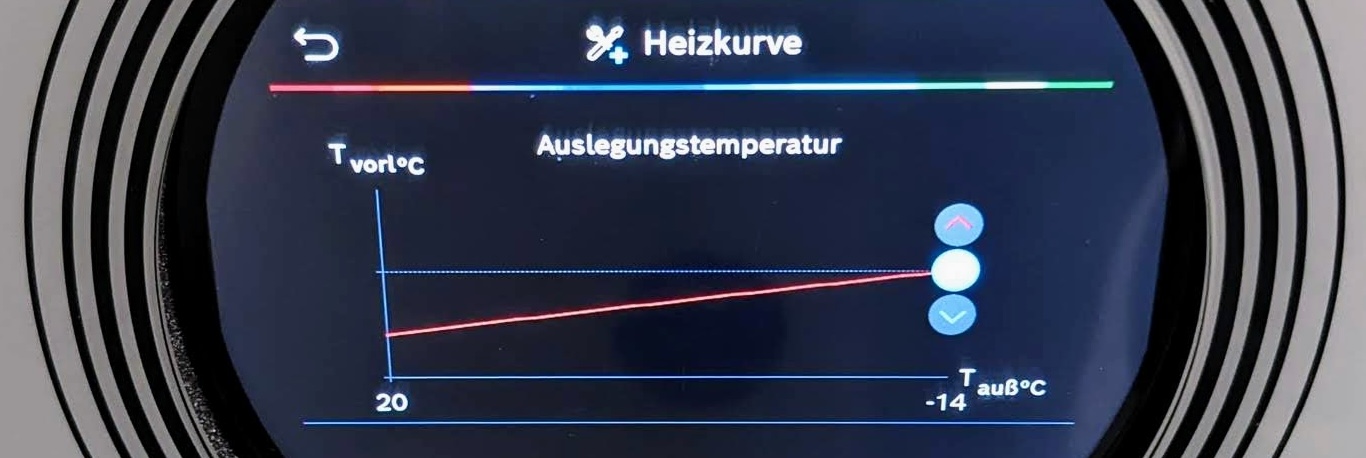
The following image shows an exemplary heating curve setting with the red line.
On the left, you can see that a lower flow temperature is required at an outdoor temperature of 20°C than on the right at -14°C.
The following chapters explain step by step how to configure the heating curve with all parameters.
Control mode
The control mode defines the basis on which the target flow temperature is determined and can be set under
System settings → Heating/Cooling → Heating circuit 1 → Heating → Control mode:
Outside temperature controlled: the heating curve is defined exclusively by the flow temperature at the minimum outside temperature (far right at -14 °C in the image above)Outside temperature with base point: additionally allows the flow temperature to be set at an outside temperature of 20 °C, the so-called base point (far left in the image above)Individual room controlled: the actual room temperature is taken into account if a room thermostat from the heat pump accessories is connected
Outside temperature damping
For all settings that relate to the outdoor temperature, please note that this does not affect the interior of the building at the same time.
When it gets colder outside, it takes some time for the cold to affect the rooms.
This inertia is set via the building damping under System settings → Heating/Cooling → System settings → Building type damping and results in the so-called damped outdoor temperature.
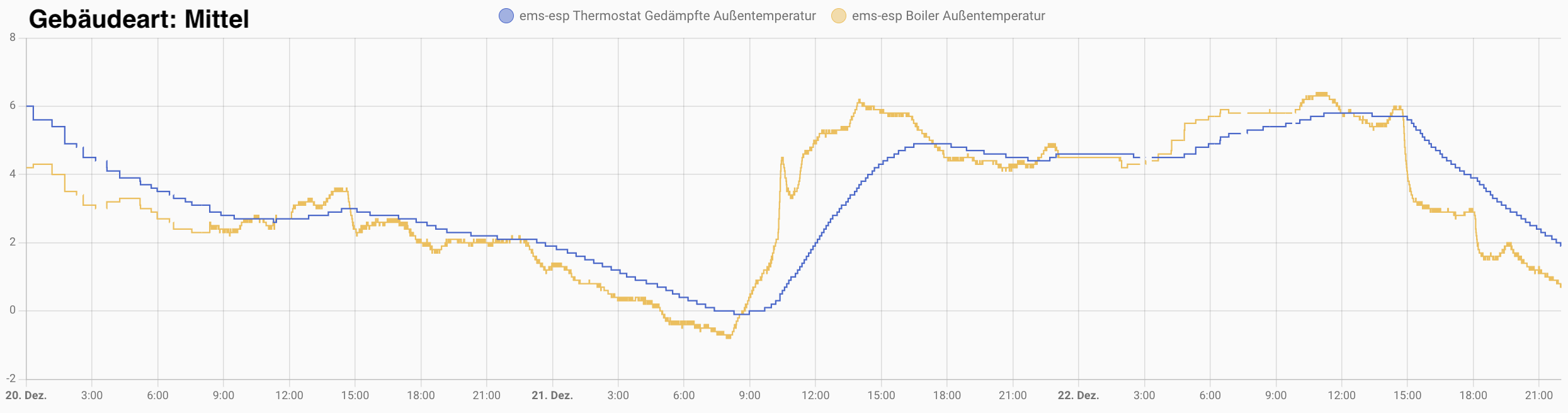
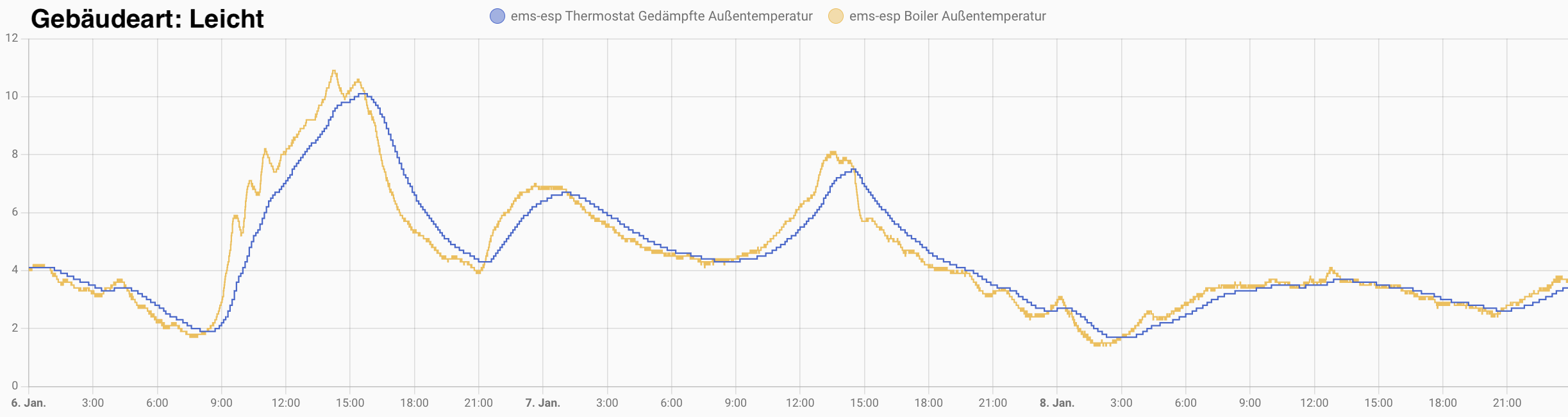
The “heavier” the building, the more slowly changes in outdoor temperature take effect, as shown in the following diagrams for medium and light building types.
The yellow line shows the measured outdoor temperature, and the blue line, offset slightly, shows the damped outdoor temperature.
For the medium building type, the offset is greater than for the light building type.
Heating limit
Naturally, it does not make sense to operate the heating system at summer outside temperatures.
Use System settings → Heating/Cooling → Heating circuit 1 → Summer/Winter changeover → Heating operation up to or Start screen → Desired temperature → More... → Heating off from to set the temperature limit at which the heating period should begin, e.g. 15°C.
It should be noted that the changeover does not take place immediately when the temperature limit is reached, in order to prevent constant switching on and off at outside temperatures around the limit value. A delay for the transition from winter to summer and from summer to winter can be set under the following menu items:
System settings→Heating/Cooling→Heating circuit 1→Summer/Winter changeover→Summer operation delay: if the limit temperature has been exceeded for the set duration, the heating is switched offSystem settings→Heating/Cooling→Heating circuit 1→Summer/Winter changeover→Heating operation delay: if the limit temperature has been undershot for the set duration, the heating is switched on
To also account for an abrupt drop in temperature, a temperature difference in Kelvin or °C can be set under
System settings → Heating/Cooling → Heating circuit 1 → Summer/Winter changeover → Temperature difference immediate start, at which the heat pump starts immediately.
Design outside temperature
System settings → Heating/Cooling → System settings → Minimum outside temperature
Here you set the design outside temperature (DOT), i.e. the lowest temperature that has been maintained 10 times within 20 years for a period of at least two consecutive days. The design outside temperature can be looked up at the German Heat Pump Association (BWP).
Flow temperature (DOT)
System settings → Heating/Cooling → Heating circuit 1 → Heating → Heating curve
Pressing the endpoint selects it. You can then use the arrow keys to set the required flow temperature at the design outdoor temperature. In addition to these values, you can also define the base point and comfort point if the simple heating curve is not sufficient.
The flow temperatures that can be set in the heating curve are your most important parameters for efficient operation—the lower, the more efficient. You can find further details on optimizing the heating curve under Optimizations: Heating Curve and Hydraulic Balancing
Heating curve simulator
Here you can check your heating curve values:
Domestic hot water production
Domestic hot water production can be carried out using any of these 3 modes:
- Comfort
- Eco
- Eco+
There is also the Extra domestic hot water mode, which attempts to heat the domestic hot water to the stop temperature on request for 1..48 hours.
The following values can be individually set for each mode under System settings → Domestic hot water:
Starttemperatur: domestic hot water production starts when this temperature limit is undershotStopptemperatur: domestic hot water production ends when this temperature limit is reachedLadedelta: the flow temperature is increased by this value for domestic hot water production - the higher the charging delta, the faster heating occurs - at the expense of efficiency
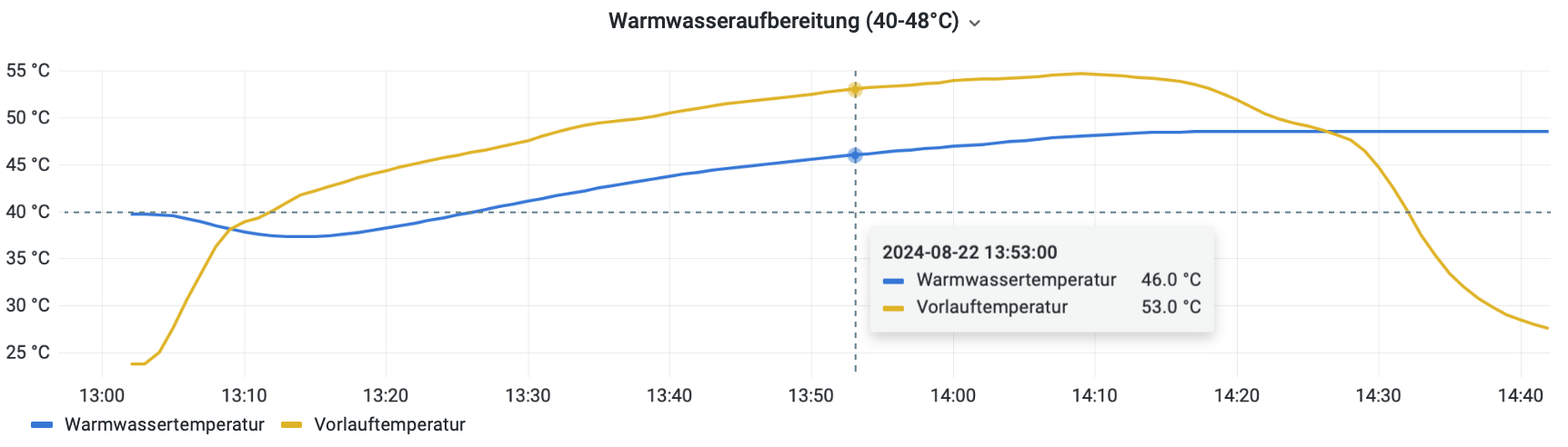
The following diagram shows the flow temperature and domestic hot water temperature for Start temperature=40°C, Stop temperature=48°C and Charging delta=7K:
Modes
| Mode | Min. start temperature | Max. stop temperature | Charging differential |
|---|---|---|---|
| Comfort | 40 °C | 65 °C | 4..18 K |
| Eco | 35 °C | 60 °C | 4..18 K |
| Eco+ | 30 °C | 55 °C | 4..15 K |
| Extra DHW | 50..70 °C |
With software versions before 9.15.0 / 12.11.1, the smallest charging delta was 6 K.
Mode selection
The mode for domestic hot water production can be selected either in the app or on the control panel under Start screen → Domestic hot water:
Off: no domestic hot water productionManual: a mode is selected manuallyAuto: the corresponding mode is selected automatically based on the current time of day. The program that should be active at which time of day must be configured for this.
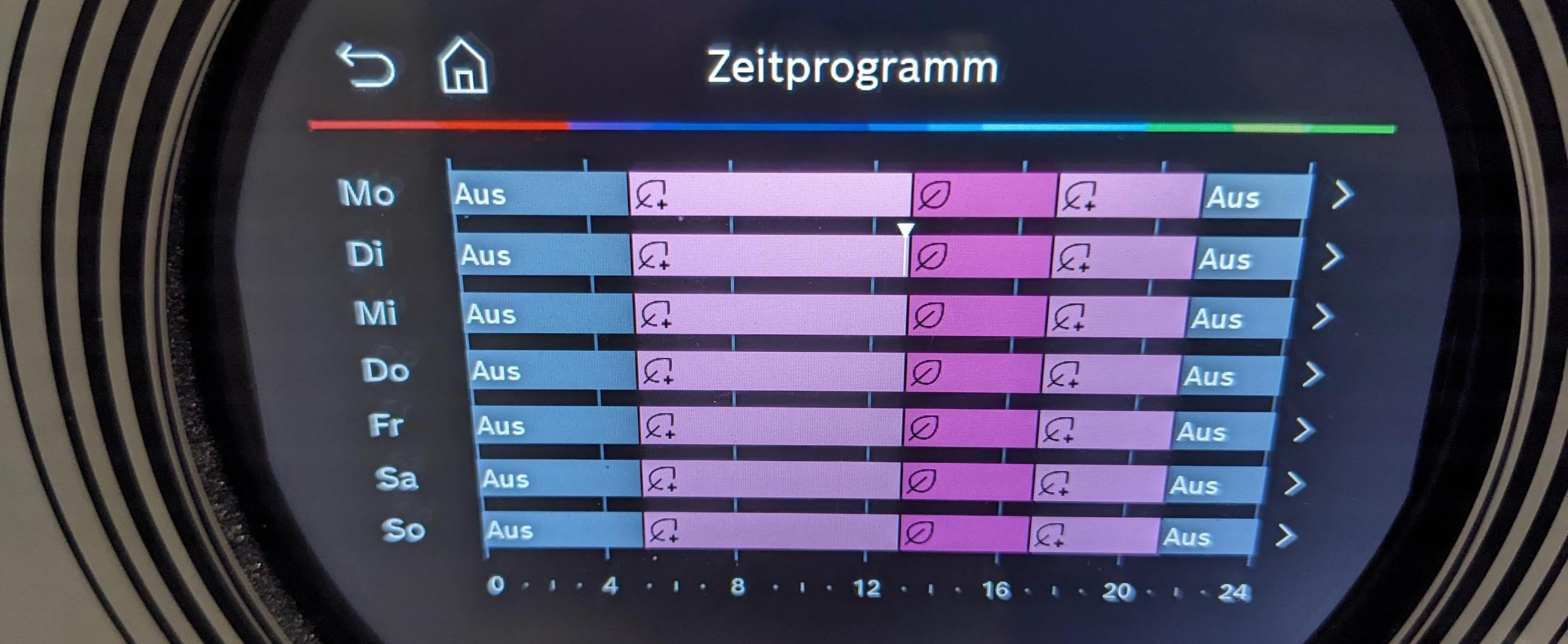
The time programs for Auto mode can either be configured in the app under Domestic hot water → Calendar bottom right or on the control panel’s start screen (not in the service menu) under Domestic hot water → More...> → Time program → Edit.
In the display above, domestic hot water production is off from 21:00-5:00, domestic hot water is heated using Eco+ mode from 5:00-13:00 and 17:00-21:00, and domestic hot water is produced using Eco mode from 13:00-17:00.
Circulation pump
If a domestic hot water circulation line with a pump is installed and the pump is controlled by the heat pump, control should be activated in the service menu under System settings → Domestic hot water → DHW circulation.
Since time programs cannot be set in the service menu, it is better to exit the service menu and then navigate to Home screen → Domestic hot water → More... → DHW circulation pump.
Operating mode
The Operating mode determines when the circulation pump may run:
Off: The circulation pump remains switched off. If you have a circulation pump, you should not select this setting under any circumstances, as otherwise legionella bacteria can form in the circulation line.On: The circulation pump automatically switches on for 3 minutes every hour. How often it does this per hour is defined below usingSwitch-on frequency.Auto: WithAuto, the circulation pump’s own time program applies, which can be configured below underTime program.According to DHW time program: The circulation pump follows the time program for domestic hot water production.
Switching frequency
The Einschalthäufigkeit determines how often the circulation pump starts during the enabled times.
You can set 1 to 6 starts per hour, each with a runtime of 3 minutes, or continuous operation.
Time program
For a custom schedule, set Operating mode to Auto and define the times under Home screen → Domestic hot water → More... → DHW circulation pump → Time program → Edit.
One possible example of times with regular domestic hot water demand is:
| Time period | Circulation |
|---|---|
| 06:00–07:00 | On |
| 12:00–12:30 | On |
| 18:00–19:00 | On |
| Remaining time | Off |
The time windows can initially be set for Monday and then copied to the remaining days.
Within the On periods, the Switch-on frequency determines how often the pump starts.
1 means one 3-minute start per hour.
Electric auxiliary heater
Heat pumps should be dimensioned so that they can cover the building’s heat demand down to approximately -5 °C (Bosch).
Below this temperature range, the heat pump is supported by an electric auxiliary heater.
The settings for the electric auxiliary heater can be configured under System settings → Auxiliary heater.
Auxiliary heater lock
If System settings → Auxiliary heater → Auxiliary heater lock is activated, the electric auxiliary heater is not used for regular heating operation or domestic hot water production, even at low temperatures.
It can still be used for frost protection and the defrost cycle despite the auxiliary heater lock.
Power limitation
The following settings can be configured under System settings → Auxiliary heater → Electric auxiliary heater:
Limitation with compressor
Value range: 0kW, 3kW, 6kW, 9kW
This setting defines the maximum output of the electric auxiliary heater to support the heat pump during operation.
Limitation without compressor
Value range: 0kW, 3kW, 6kW, 9kW
This can be used to set the maximum output of the electric auxiliary heater when the compressor is not running, for example in emergency operation.
Limitation in DHW operation
Value range: 0kW, 3kW, 6kW, 9kW
This setting defines the maximum output of the electric auxiliary heater that may be used for domestic hot water production.
Bivalent point parallel operation
The aforementioned temperature limit from which the backup heater may support the heat pump—the so-called bivalent point—is specified in this menu item, e.g. -7°C.
Heating delay
If the bivalence point temperature is undershot, the auxiliary heater is activated if the target flow temperature is not reached, defined as a temperature-difference–time product, e.g. 600 K*min. In this case, 600 K*min means that the auxiliary heater is switched on in the following example situation:
- The target flow temperature is undershot by 10 K (°C) for 60 minutes
- The target flow temperature is undershot by 2.5 K (°C) for 4 hours
- The target flow temperature is undershot by 1 K (°C) for 10 hours